Skip to content
My Commitments | Administrator Login
ivolunteer.com
  • Benefits and Features
  • Plans
  • Examples
  • Testimonials
  • SupportExpand
    • Support Overview
    • Frequently Asked Questions
    • Training Videos
    • Tips & Tricks
    • Administration Help
    • Volunteer Help
    • Consultation
  • Blog
  • About
  • Contact
My Commitments | Administrator Login
ivolunteer.com

Quick Start Guide

  • Administrator Login
  • Create A New Event / Signup Opportunity
  • Verify Your Time Zone
  • Manage Existing Signup Events
  • Add/Edit Signup Tasks (Classic Way)
  • Review Your Event Settings

ivolunteer.com Administration Guide

  • Purchasing a Subscription after the Free Trial
  • Administrator Login
  • The Admin Dashboard
  • Event Pre-Launch Checklist
  • Setting Up Your Organization and New Event Defaults
    • Organization Menu
    • Editing Your Organization Details
      • Organization Details
      • Subscription Tab
      • Administrators Tab
      • Home Pages Tab
      • Files Tab
      • New Event Defaults
      • Organization Default Settings vs. Event Settings
    • Adjusting Organization Settings and Defaults
      • Organization Settings
      • Administration Help Guide
  • Setting Up an Event with a Signup Sheet
    • Events Menu
    • Create A New Event / Signup Opportunity
    • Selecting an Event
    • Copying An Event
    • Removing An Event
    • Key Event Info and Functions
    • Editing Event Details
      • Event Details & Actions
      • Event Info Tab
      • Event Layout Tab
      • Event Prompts Tab
      • Signup Sheet Design Tab
      • Working with Tasks
      • Assigning Points to Signup Slots
      • Working with the Task Signup Sheet
      • Preview an Event
      • Send Emails and Texts to Your Volunteers
      • Manage and Add Participants
      • Set Up and Run Event Reports
      • Sign In to Track Attendance
    • Adjusting Event Settings
      • Event Display Tab
      • Event Dialog Messages
      • Event Email Templates
      • Event Date/Time
      • Event Logo
      • Event Payments
    • Viewing the Event Activity Log
      • Activity Log Tab
  • Communicating with Your Volunteers
    • Ways to Communicate with Your Volunteers
  • Working with Your Participant Database
    • Database Menu
    • Participants Tab
    • Groups Tab
    • Send Email Tab
    • Database Reports
  • Notes
    • Notes
    • About Variables
    • About the Rich Text Editor

Volunteer Help

  • How do I cancel a commitment / slot?
  • How do I change my email address?
  • How do I modify my information for a commitment?
View Categories
  • Home
  • ivolunteer.com Administration Help
  • ivolunteer.com Administration Guide
  • Communicating with Your Volunteers

Ways to Communicate with Your Volunteers

0:00 / 2:15
  • View as Markdown Open this page as plain Markdown (opens in a new tab)
  • Export PDF Download this page as a PDF
  • Open in ChatGPT Ask questions about this page (opens in a new tab)
  • Open in Claude Ask questions about this page (opens in a new tab)
  • Open in Google AI Studio Ask questions about this page (Google account required) (opens in a new tab)

You have three ways to communicate with volunteers who are in your participant database or who are confirmed in a signup slot: by email, by text (Premium), and in the new Message Center within My Commitments.

Sending and Scheduling Emails #

Email is the main method of communicating with your volunteers. See the following articles for instructions on how to compose and schedule emails and how to modify the default email templates for confirmations, reminders, and more.

Email volunteers and individual, signed-up volunteers in an Event:
Send Emails and Texts to Your Volunteers

Email your entire database or a database group (Premium):
Send Email Tab

Customize an Event’s email templates:
Event Email Templates

Text Notifications (Premium) #

If you have a Premium account, your volunteers can also opt into text notifications. You will still send and schedule your communications from the Send Email or Manage tab, but the volunteer will get a short text linking to your message in the Message Center of their My Commitments portal (see below). They can also continue to receive email notifications if they wish.

Currently, only participants with U.S. and Canadian phone numbers (country code +1) can receive notifications and communications by SMS text messages. When a participant opts in, texts are enabled from any organization that has a Premium account.
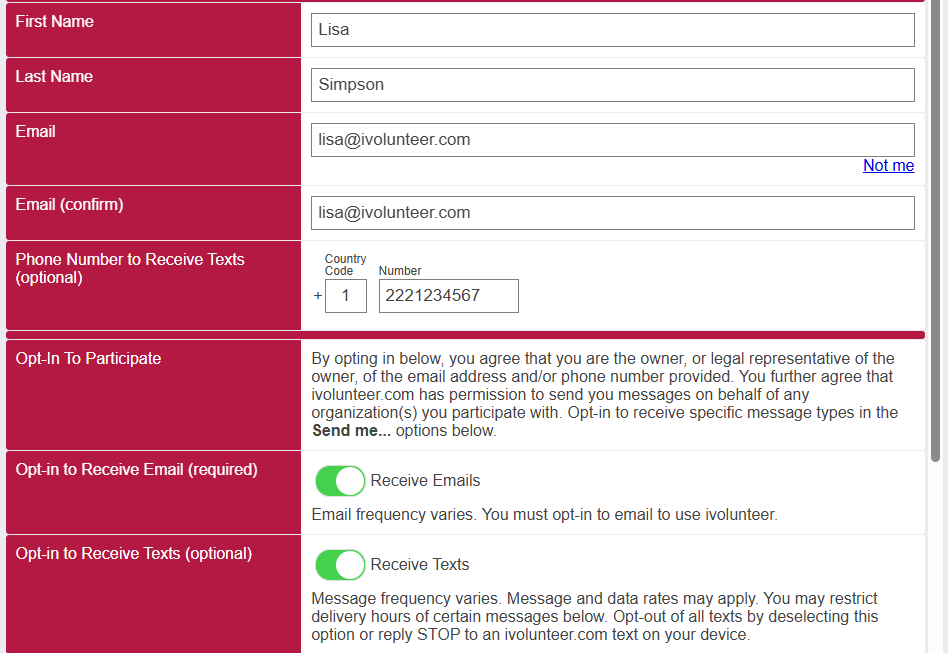
ivolunteer settings to opt into text SMS messages in My Commitments portal

Here are the instructions for participants to opt in.

  1. Log into your My Commitments portal from a confirmation link, or go to https://participant.ivolunteer.com and log in with your email address.
  2. Click Settings to open your volunteer settings. Enter your mobile phone number in the Phone Number to Receive Texts field.
  3. Toggle the opt-in. Options then will appear for the types of notifications, the time window, and the frequency of texts you wish to receive.
  4. Click Save. You will be prompted to verify a code sent to your phone.

Organization Settings for Text Messages #

Under Organization > Organization Settings > Text, enter the Organization Name as It Will Appear in Texts (40 characters maximum). This value defaults to your main organization name.

Message Center #

All participants now have a Message Center in their My Commitments portal. When participants are logged into My Commitments, they can click Messages to see signup confirmations, reminders, and other notifications from your organization. A participant who volunteers with more than one organization will see all of their messages in one place, based on the email address with which they have logged into My Commitments.
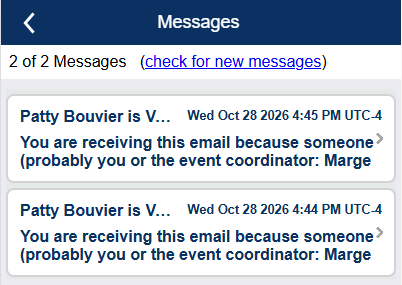
screenshot of ivolunteer.com message center with messages for volunteer
Table of Contents
  • Sending and Scheduling Emails
  • Text Notifications (Premium)
    • Organization Settings for Text Messages
  • Message Center
  • Benefits and Features
  • Plans
  • Examples
  • Testimonials
  • Support
  • Blog
  • About
  • Contact

Privacy Policy | Application Terms of Use

© 2026 ivolunteer.com. All Rights Reserved.

  • Benefits and Features
  • Plans
  • Examples
  • Testimonials
  • Support
    • Support Overview
    • Frequently Asked Questions
    • Training Videos
    • Tips & Tricks
    • Administration Help
    • Volunteer Help
    • Consultation
  • Blog
  • About
  • Contact
This site uses cookies to provide you with a personalized browsing experience. By using this site you agree to our use of cookies as explained in our Privacy Policy.